Designing a Loxone installation online — from floor plan to documentation
Prepare a Loxone installation in EH Designer: rooms, devices, wiring, distribution board and quotation.
Read guide →Systems · guide for installers
Design a Hikvision CCTV installation: select cameras, set viewing directions, plan cables and prepare documentation.
Prepared by EnergyHouse · Updated: 19 October 2026
Before selecting a camera, define the purpose of each position: an entrance, driveway or side of the building. Device locations should follow what the client needs to see. The number of cameras alone does not establish whether important areas are covered.
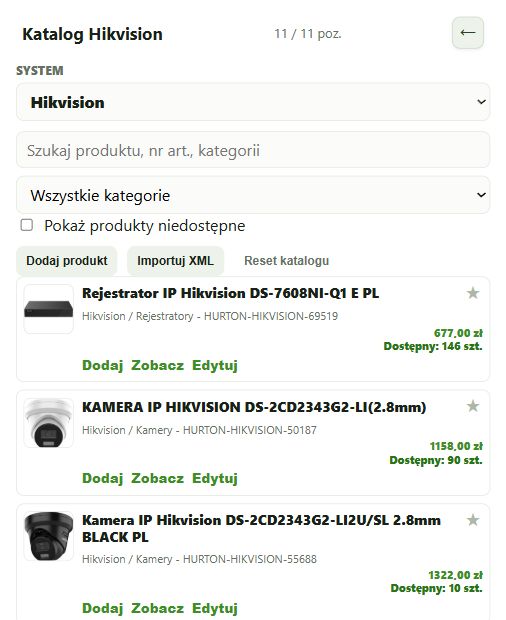
Add exact models from the Hikvision catalogue, set their directions and review their fields of view. Then combine the camera plan with recorder selection, recording storage and network infrastructure. Finally, present a clear layout and quotation. Prices in the screenshot are examples and do not constitute a current sales offer.
Search for the exact model in the appropriate system or manufacturer’s catalogue.
Prices and stock levels come from the catalogue’s data source. Check current availability before purchasing.
The area shown on the plan helps assess the device’s direction and coverage.
The coverage drawing is a design aid. Range and geometry must match the specific model’s documentation and installation conditions.
Port counts and power requirements depend on the specific device model.
The U size specifies the device’s mounting height in the rack.
You can adjust the document scope before generating it.
Open EH Designer on a computer with a mouse. Start with one room or part of the installation, review the result and expand your project. For available plans, see pricing.
Create an EH Designer accountPrepare a Loxone installation in EH Designer: rooms, devices, wiring, distribution board and quotation.
Read guide →Plan an installation using Nice products, organise device models and prepare a materials list for your client.
Read guide →Plan a UniFi network, organise port assignments and design the equipment rack in EH Designer.
Read guide →