Designing a Nice installation — devices, blinds and estimates
Plan an installation using Nice products, organise device models and prepare a materials list for your client.
Read guide →Systems · guide for installers
Prepare a Loxone installation in EH Designer: rooms, devices, wiring, distribution board and quotation.
Prepared by EnergyHouse · Updated: 19 October 2026
Start a Loxone project with the functions required in each room. Record lighting, wall controls, blinds and heating requirements separately before selecting individual products. This makes the layout reflect the client's needs and the purchasing list reflect the design.
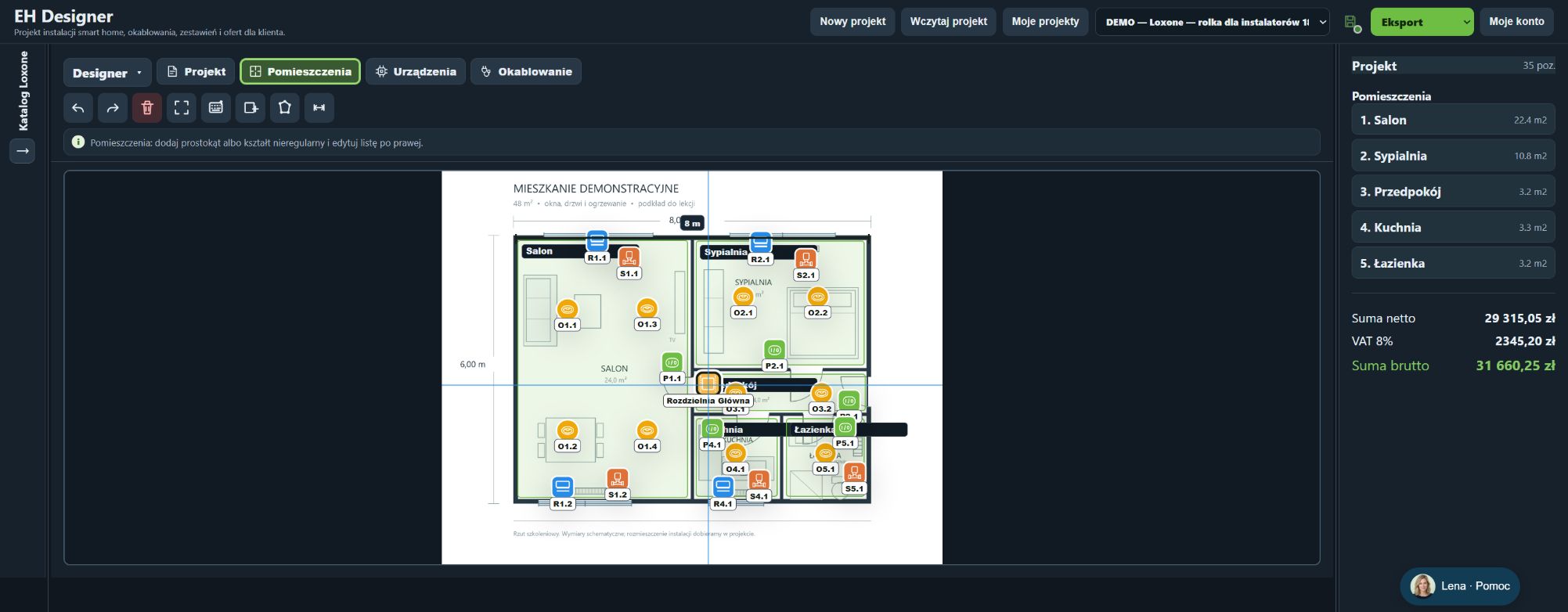
In the demonstration project, we define rooms first, then add all lights, wall controls, blinds and valve actuators. This sequence makes room specifications easier to compare. Before preparing a quotation, check room assignments, labels and device routes. EH Designer supports installation design and estimating; system behaviour is configured separately using the manufacturer's software.
Room outlines help assign devices to the correct rooms.
Search for the exact model in the appropriate system or manufacturer’s catalogue.
Prices and stock levels come from the catalogue’s data source. Check current availability before purchasing.
The lighting circuit wizard combines a light source with the components needed to operate it.
Do not add components that are already included in the set.
The wizard helps you select the blind or curtain system, motor and controller.
The distribution board view is used to arrange modules and prepare documentation.
Automatic selection is preliminary. The installation and protective devices must be checked by a suitably qualified person.
The project PDF documents the plan and selected installations.
Do not change the project while the export is being generated. If the export fails, try a smaller selection of pages and report the problem with the settings you used.
Open EH Designer on a computer with a mouse. Start with one room or part of the installation, review the result and expand your project. For available plans, see pricing.
Create an EH Designer accountPlan an installation using Nice products, organise device models and prepare a materials list for your client.
Read guide →Plan a UniFi network, organise port assignments and design the equipment rack in EH Designer.
Read guide →Design a Hikvision CCTV installation: select cameras, set viewing directions, plan cables and prepare documentation.
Read guide →