Designing a Loxone installation online — from floor plan to documentation
Prepare a Loxone installation in EH Designer: rooms, devices, wiring, distribution board and quotation.
Read guide →Systems · guide for installers
Organise a Satel alarm project: place devices, plan routes to the control panel and prepare a materials list.
Prepared by EnergyHouse · Updated: 19 October 2026
Begin by agreeing the protection scope with the client. Record building entrances, areas requiring protection and system control locations. Use this information to plan devices and the control panel location. A clear floor plan helps confirm assumptions before installation begins.
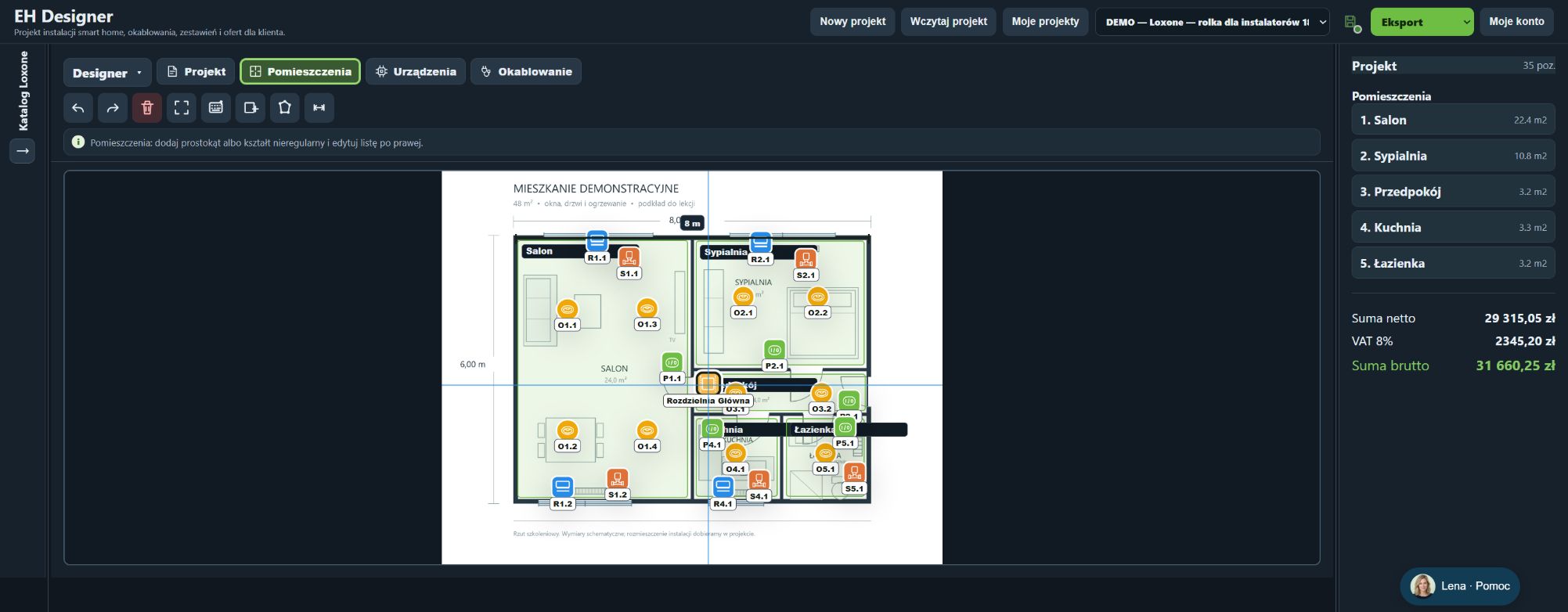
Search for exact models in the Satel catalogue and assign them to the appropriate rooms. For wired devices, verify the route to the alarm panel, cable type and installation description. Check input capacity, power supply and compatibility against the selected products' documentation. The illustration demonstrates layout organisation in a Loxone project; it is not a completed Satel alarm design.
Search for the exact model in the appropriate system or manufacturer’s catalogue.
Prices and stock levels come from the catalogue’s data source. Check current availability before purchasing.
Click a symbol on the plan or an item in the list to open its details.
Export a JSON project backup before changing many objects.
The route type defines the device’s connection destination.
In Wiring, configure the cable’s use and select a specific catalogue product.
Also consider the operating environment, shielding and conductor type when selecting cables. A similar name does not prove compatibility.
The project PDF documents the plan and selected installations.
Do not change the project while the export is being generated. If the export fails, try a smaller selection of pages and report the problem with the settings you used.
Open EH Designer on a computer with a mouse. Start with one room or part of the installation, review the result and expand your project. For available plans, see pricing.
Create an EH Designer accountPrepare a Loxone installation in EH Designer: rooms, devices, wiring, distribution board and quotation.
Read guide →Plan an installation using Nice products, organise device models and prepare a materials list for your client.
Read guide →Plan a UniFi network, organise port assignments and design the equipment rack in EH Designer.
Read guide →